Cisco Linksys SPA 3102
The Linksys SPA 3102 is an ATA allowing the user to use a POTS phone to access a VoIP service.
Configuration
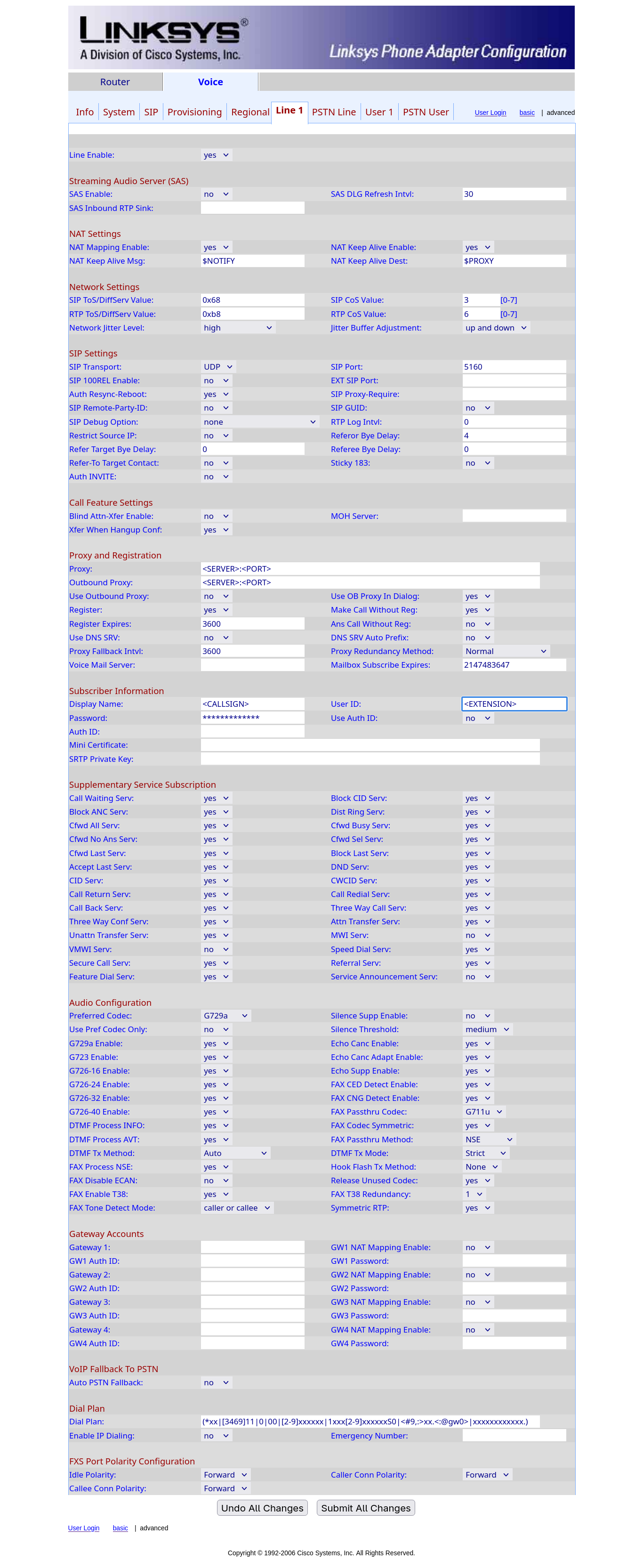
Go to the ATA's admin page. The default URL is http://sipuraspa/admin, but you may have to replace sipuraspa with the IP address that the device obtained from your router in your network.
- Choose “Admin Login”, then enable the “advanced” mode (both top right)
- In the “Voice” section, choose the “Line 1” subsection
-
Set the following parameters:
-
NAT Settings
- NAT Mapping Enable: Yes
- NAT Keep Alive Enable: Yes
-
SIP Settings
- SIP Port: 5160
-
Proxy and Registration
- Proxy: This will be the domain name sent in your credentials email (ex:
pbx-us1.hamsoverip.com:5160) - Outbound Proxy: Same
- Register Expires: 3600
- Use DNS SRV: No
- DNS SRV Auto Prefix: No
- Proxy: This will be the domain name sent in your credentials email (ex:
-
Subscriber Information
- Display Name: Enter your Callsign and name.
- User ID: Enter your Extension from the credentials email.
- Password: Enter your password from the credentials email.
- Use Auth ID: No
-
Last updated 2025-10-26 by Olivier VK7SHM